Chapter 1: From mutable objects to immutable data
In this chapter:
- Why mutable objects make state difficult to track in large programs
- The central idea: express “change” as “transformation”
- Creating new versions of immutable data with C#
recordandwith - Three core benefits: predictability, testability, and traceability
- A simple example showing this shift in design style
- Situations where mutable design still fits
When writing code, changing an object’s state in place often feels like second nature. Here, state means the data values an object holds at a particular time, such as its property or field values.
For example, to mark an order as paid, an intuitive approach is:
This is direct and clear. When an order is used within a single workflow and its state changes are easy to track, modifying the object directly is often convenient.
As the program grows, however, directly changing object state can become troublesome. You start to lose track of an object’s state at a particular moment, and of who changed it and when.
Starting with this problem, this chapter introduces immutable data design: instead of modifying an object directly, express each change as creating a new version. This may seem like a small shift, but in data-centric applications it strongly affects data modeling, state transitions, testability, and maintainability. It is the central idea of the book.
Immutable design may reduce maintenance and debugging costs, but runtime performance needs a separate assessment. Creating new object versions can increase memory allocation costs, so use performance tests to measure the effects on execution time and memory use.
1.1 The trouble with mutable objects
Mutable object designs usually start out reasonable. Problems emerge as systems grow more complex: the same object is passed to different methods, services, or background workflows, and each can change part of its state.
Consider an order management system. After creation, an order may be submitted, paid, shipped, or cancelled under certain conditions. A straightforward design is to define an Order class whose properties hold all the order’s details:
public class Order
{
    public string Id { get; set; } = string.Empty; // Order ID
    public string CustomerId { get; set; } = string.Empty; // Customer ID
    public OrderStatus Status { get; set; }     // Order status
    public List<OrderLine> Lines { get; set; } = []; // Order lines
    public decimal Total { get; set; }          // Order total
    public DateTimeOffset CreatedAt { get; set; }    // Creation time
    public DateTimeOffset? SubmittedAt { get; set; } // Submission time
    public DateTimeOffset? PaidAt { get; set; }      // Payment time
    public DateTimeOffset? ShippedAt { get; set; }   // Shipping time
    public string? CancelReason { get; set; }   // Cancellation reason
}
We can then add a service, OrderService, to handle state transitions:
public class OrderService
{
    public void Submit(Order order, DateTimeOffset now)  // (1)
    {
        order.Status = OrderStatus.Submitted;
        order.SubmittedAt = now;
    }

    public void Pay(Order order, DateTimeOffset now)  // (2)
    {
        order.Status = OrderStatus.Paid;
        order.PaidAt = now;
    }

    public void Ship(Order order, DateTimeOffset now)  // (3)
    {
        order.Status = OrderStatus.Shipped;
        order.ShippedAt = now;
    }

    public void Cancel(Order order, string reason)  // (4)
    {
        order.Status = OrderStatus.Cancelled;
        order.CancelReason = reason;
        order.SubmittedAt = null;
        order.PaidAt = null;
    }
}
The service provides four methods:
Submit: mark the order as submitted and record the submission time.Pay: mark it as paid and record the payment time.Ship: mark it as shipped and record the shipping time.Cancel: mark it as cancelled, save the reason, and clear the submission and payment times.
Source code: DemoMutableOrder
The design works in a small program, but closer examination reveals several risks.
Risk 1: unclear relationships between state and data
The Cancel method clears SubmittedAt and PaidAt:
Should cancellation clear these properties? If an order was paid before cancellation, should PaidAt remain as history or be erased?
In this design, you must read the implementation to understand the relationship between property values and their business meaning. The type does not express it.
The many nullable properties, such as PaidAt and ShippedAt, complicate matters. PaidAt == null might mean “not yet paid” or “previously paid, but the record was cleared on cancellation.” One null has two business meanings. Would simply making Order immutable remove the ambiguity? No.
If Status is still paired with the same nullable properties, PaidAt == null remains open to different interpretations. A complete improvement requires more precise types that explicitly express each state and the data it carries. Immutable design encourages us to write state transitions as clear workflows, rather than clearing properties and changing state on one object while scattering the meaning across methods.
This is a problem of data representation. Code must do more than store data; it must communicate what the data means. If the relationships among Status, PaidAt, and CancelReason exist only in developers’ heads, every use of Order may require guessing what a property means. Incorrect guesses can become bugs.
Risk 2: any method can change any property
Every property on Order has a public setter ({ get; set; }). Any code holding a reference to an order can change any property at any time:
This may be manageable in a small codebase with a small team. In a larger system, an Order can pass through several services, middleware components, or event handlers. You start to wonder: is its Status still Submitted here? Has something already changed it?
To answer, you may have to replay the entire execution in your head or step through state changes in a debugger. Even with an AI agent’s help, you must investigate every piece of code that could modify the object. Having to inspect so many places to establish the current state is what “hard to reason about” means.
Risk 3: several places modify the same object
Suppose another asynchronous workflow, such as an automatic notification job, reads or changes the same order while OrderService.Pay is running.
Concurrent access to the same mutable object without proper synchronization can cause a race condition. Here, Pay sets Status first and PaidAt second. Without synchronization, another thread reading the order between these assignments could see a partially updated state: Status is already Paid, but PaidAt is still null.
These problems are difficult to reproduce reliably and therefore difficult to debug.
1.2 A different perspective: express change as transformation
What does “changing an order’s state” really mean? Before payment you have a submitted order; afterward you want a paid version of the same order. Most of their data is the same; only the status and payment time differ.
With mutable objects, you change the same object from one state to another. That is certainly intuitive.
But there is another approach: create a new order version from the old one. Leave the old object unchanged and give the new object the new state. “Change = create a new version” is the core of immutable data design.
In C#, the two approaches look like this:
With immutable design, order keeps its original property values; paidOrder is a newly created object with the updated state.
The key idea is that whenever you need to change state, you create a new version. To keep using the paid order, assign that version to a new variable or reassign the original variable:
This looks like “changing order,” but it actually makes the variable refer to a new object. No property on the old object is reassigned. Immutable design prevents in-place modification of the object; it does not prohibit a variable from referring to a new value.
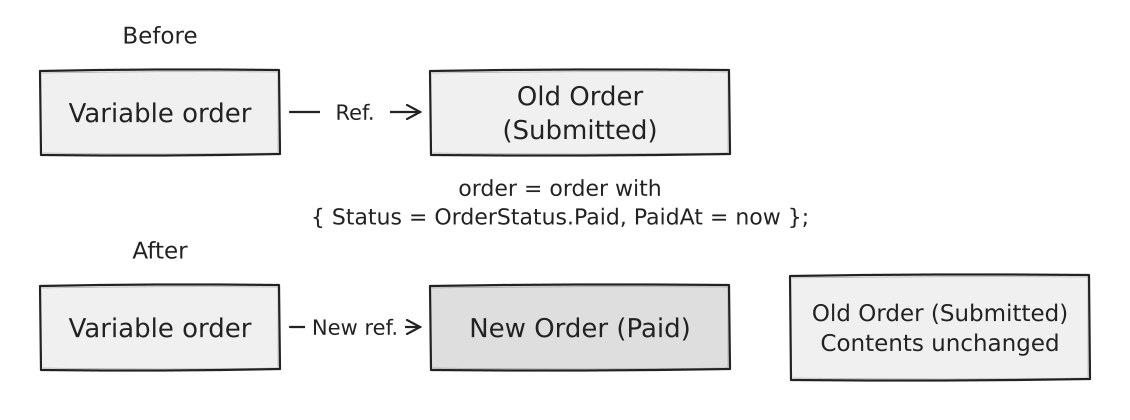
This shift in how we express updates has more far-reaching effects than you might expect. Next, we will see why.
1.3 C# records and with expressions
Before discussing the benefits, let us examine C#’s language support for this design.
Creating immutable data with records
C# 9 introduced record with features that make it convenient to represent data values, including immutable data. Positional parameters or init properties make it easier to write data objects that are not changed after creation. Here is a simple form:
Declaring the main data members in parentheses after the type name is called a positional record. The compiler automatically:
- Creates init-only properties, which can be assigned only during object initialization. Chapter 2 covers them in detail.
- Implements value-based equality (
Equals,GetHashCode). - Generates
ToStringfor debugging.
You can create an Order as follows:
Once created, its init-only properties cannot be directly reassigned:
order.Status = OrderStatus.Paid; // Compile error! Initialization is already completeInit-only properties therefore make it easier to define data objects whose properties cannot be reassigned after creation.
Creating a new version with a with expression
Another important record feature is the with expression. It creates a new version from an existing record, changing selected properties and retaining the rest:
After this code runs:
orderretains its original property values and state.paidOrderis a newOrderwith updatedStatusandPaidAt.
In other words, with copies the existing object and applies specified changes. You must assign the result to paidOrder or pass it along to the next step. If you ignore the new object, the original order remains unchanged.
This is how C# expresses change as transformation.
Source code: DemoRecordBasics
The copy is shallow: value-type members have their values copied; reference-type members have only their references copied, not the referenced objects. If a property references a mutable collection, the old and new records may still share it. Immutable data design also needs appropriate member types, as Chapter 2 explains.
Note
withexpressions for records arrived in C# 9 and were extended to structs and anonymous types in C# 10. Projects using C# 8 or earlier need alternatives such as manual copying.
1.4 Three benefits of immutable design
With the basic syntax in place, let us see what this style actually solves.
Benefit 1: predictability
Predictability means an object is not modified in place somewhere you cannot see. Once this chapter’s Order has been initialized, passing it to another method does not let that method reassign its init-only properties.
Init-only restricts reassignment after initialization; it does not make referenced objects immutable. If
Orderlater gains a collection property, check whether the collection and its elements can change before assuming other code cannot alter the order’s contents. Chapter 2 explains this further, and Chapter 3 builds a more completeOrderexample.
For example:
// With immutable design, this code has predictable behavior
var now = DateTimeOffset.UtcNow;
var submittedOrder = OrderWorkflow.Submit(draft, now);
var paidOrder = OrderWorkflow.Pay(submittedOrder, now);

// submittedOrder is still Submitted here
// paidOrder is Paid
// These are different Order objects
Console.WriteLine(submittedOrder.Status); // Submitted
Console.WriteLine(paidOrder.Status);      // Paid
OrderWorkflow is a static class containing creation and transition methods. For now, treat it as a set of operations that receive an old version and return a new one. Section 1.5 examines the implementations.
With mutable design, you might wonder whether OrderWorkflow.Pay changed submittedOrder and have to read its implementation. In this immutable design, Pay returns another Order without changing any properties on submittedOrder.
Benefit 2: testability
Immutable data makes tests easier for two reasons.
First, transformations leave test inputs unchanged. If you create a draft order and pass it through several transformation methods, its state remains unchanged.
Second, you can verify each transition separately. Each step returns a version representing its result, so tests can inspect each version’s state. This xUnit example uses [Fact] simply to mark a test method:
[Fact]
public void Order_Should_Track_Each_State_Transition()
{
    // Arrange: establish the starting state.
    //   Later operations will not change draft's state.
    //   fixedTime keeps time-related assertions stable and repeatable.
    var fixedTime = new DateTimeOffset(
        2026, 1, 1, 9, 0, 0, TimeSpan.Zero);
    var draft = OrderWorkflow.Create("CUST-42", [], fixedTime);

    // Act + Assert: Submit returns a new order version.
    var submitted = OrderWorkflow.Submit(draft, fixedTime);
    Assert.Equal(OrderStatus.Submitted, submitted.Status);
    Assert.Equal(fixedTime, submitted.SubmittedAt);

    // Pay receives submitted and returns another new order version.
    var paid = OrderWorkflow.Pay(submitted, fixedTime.AddHours(1));
    Assert.Equal(OrderStatus.Paid, paid.Status);
    Assert.Equal(fixedTime.AddHours(1), paid.PaidAt);

    // Pay did not change submitted's state.
    Assert.Equal(OrderStatus.Submitted, submitted.Status);
    Assert.Null(submitted.PaidAt);
}
Source code: DemoOrderStateTests
The test clearly shows the transition sequence and verifies each transition independently.
Benefit 3: traceability
Immutable data works well for snapshots: each transformation can create an object representing the state at that moment. Retaining the versions you need establishes a clear history.
This is useful for audit logs, event sourcing, and troubleshooting:
// Step through state transitions using a single base timestamp
var now = DateTimeOffset.UtcNow;
var order = OrderWorkflow.Create("CUST-42", lines, now);
var submittedOrder = OrderWorkflow.Submit(order, now);
var paidOrder = OrderWorkflow.Pay(
    submittedOrder, now.AddHours(2));
var shippedOrder = OrderWorkflow.Ship(
    paidOrder, now.AddDays(1));

// Retain each step's state snapshot in memory
var auditTrail = new[]
{
    order, submittedOrder, paidOrder, shippedOrder
};
Source code: DemoImmutableOrder
With mutable design, changing an object erases its previous state unless you add a snapshot mechanism. With immutable design, the object’s state stays unchanged and a new version represents a change. You can choose which versions to persist as history without manually taking a snapshot before each modification.
Note: Immutable design does not automatically retain these versions; history still needs additional code. Nor is immutable design itself an audit log or event sourcing.
1.5 Revisiting Order: the immutable version
Let us combine these ideas to redesign Order.
First, define it as a record:
public sealed record Order( // (1)
    string Id,
    string CustomerId,
    OrderStatus Status,
    IReadOnlyList<OrderLine> Lines, // (2)
    DateTimeOffset CreatedAt,
    DateTimeOffset? SubmittedAt = null, // (3)
    DateTimeOffset? PaidAt = null,
    DateTimeOffset? ShippedAt = null,
    string? CancelReason = null
)
{
    public decimal Total => Lines.Sum(
        line => line.UnitPrice * line.Quantity); // (4)
}
Several decisions deserve attention:
sealedprohibits derived classes, indicating inheritance is not intended.IReadOnlyList<OrderLine>replacesList<OrderLine>, so the public API does not expose line-item mutation. This is only an initial safeguard; Chapter 2 examines genuine collection immutability.- Parameters with default values come last. When creating an
Order, callers can omit arguments for optional parameters such asSubmittedAt, but must supply arguments for the required parameters that precede them. Totalis derived fromLines, preventing callers from making line items and the total inconsistent.
Note
IReadOnlyList<T>is not an immutable collection. It only prevents direct addition or removal through that interface. Other code holding the underlying collection may still change its contents. Chapter 2 provides details.
Next, define these transitions in OrderWorkflow:
Create: create an unsubmitted order inDraftstate.Submit: transform a draft into a submitted order.Pay: transform a submitted order into a paid order.Ship: transform a paid order into a shipped order.Cancel: create a cancelled version, preserving historical timestamps.
A simplified transition diagram shows their relationships:
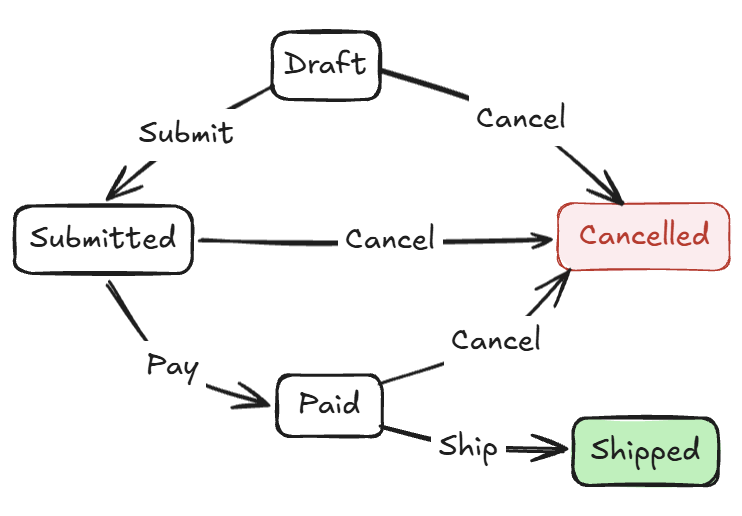
This is a simplified flow for the chapter’s example. Later chapters address restrictions on invalid transitions.
For readability, we will walk through OrderWorkflow in several smaller sections. All the following methods belong to this class; the outer public static class OrderWorkflow declaration is omitted.
Start with Create, which creates a draft:
The caller supplies now, which Create assigns to CreatedAt, rather than having the method read the system clock. Tests can supply a fixed time, so unit and integration tests do not depend on when they run. Order.Total computes the total from line items on demand, keeping them consistent.
To keep Chapter 1 simple, Create still calls Guid.NewGuid() internally, so its output is not yet determined entirely by its parameters. Chapter 4 moves ID and time acquisition to the application layer, which passes them into a domain factory.
Application layer and domain factory
The application layer coordinates a use case, for example obtaining an order ID and the current time and calling the domain model. The domain model handles business rules. See Microsoft’s The application layer.
A domain factory encapsulates domain-object creation and ensures that business rules hold at creation. In Chapter 4, it receives data from the application layer, checks order-creation conditions, and returns a valid order. See “Factories” on page 18 of Eric Evans’s DDD Reference.
Typical transitions, Submit and Pay, receive an existing Order and create a new version with with:
Neither method changes the input’s properties. SubmittedAt and PaidAt appear only on the returned versions; the original order retains its values.
Finally, let us add shipping and cancellation. The cancellation method preserves any submission and payment times already recorded.
public static Order Ship(
    Order order,
    DateTimeOffset now)
{
    return order with
    {
        Status = OrderStatus.Shipped,
        ShippedAt = now
    };
}

public static Order Cancel(Order order, string reason)
{
    return order with
    {
        Status = OrderStatus.Cancelled,
        CancelReason = reason
        // Note: preserve SubmittedAt and PaidAt
        // They are historical records and should not be cleared
    };
}
Source code: DemoImmutableOrder
Notice that Cancel only adds a reason and changes the status. It does not clear SubmittedAt or PaidAt. This reflects the example’s business rules: cancellation records a new state while preserving past events.
Compared with the mutable design:
Transitions have a consistent form.
Submit,Pay, and similar methods receive old versions and return new ones. A method signature alone cannot guarantee that its input will remain unchanged, but following this convention across the workflow gives callers a consistent usage model.Cancellation preserves historical timestamps. Under the business rules assumed in this chapter, cancelling an order does not erase earlier events. Other systems must choose representations according to their own cancellation, voiding, and refund rules.
Several places can use the same
orderwithout in-place state changes. CallingPay(order, now)in one place does not suddenly make another caller’sorderpaid.
Note
inandref readonlydo not guarantee object immutability. They indicate read-only reference passing and prevent reassignment of the parameter inside the method. See the C# reference Method parameters and modifiers.A read-only reference does not make its target immutable. For a class or record class,
in Order orderprotects only the parameter variable. The method may still invoke mutable members that change internal state, and the underlyingorder.Linescollection does not become immutable.Here, the design relies primarily on
Orderhaving init-only properties and onOrderWorkflowreturning new versions instead of modifying its inputs. Parameter modifiers do not provide these guarantees.
1.6 When does state change?
People new to immutable design often ask: “When do we actually change the object’s state?”
The answer is: when data needs updating, create and use a new version instead of modifying the original data object.
The following simplified example shows the read–transform–save flow. The repository and time-source implementations are omitted:
clock represents a custom time source. clock.UtcNow is not a built-in .NET API; assume it returns the current UTC time. Its type and implementation are omitted.
orderRepository encapsulates reads and saves, hiding the storage technology. Its implementation may use Entity Framework Core, another ORM (object-relational mapping), Dapper, handwritten SQL, or another storage mechanism. The implementation of SaveAsync will vary accordingly; the point is that the caller passes the new version for saving. Chapter 5 discusses ORM tracking trade-offs.
The database record changes, but the original order object does not. The sequence is: read old state → calculate new state → save new state.
Each step can be tested independently, and the overall flow is easier to understand.
1.7 Where mutable design fits
Immutable design is not appropriate for everything. Mutable design is often more natural for:
- ORM entities: Entity Framework Core’s conventional tracking model observes changes on the same entity and writes them back. Creating a new object each time requires additional handling of identity and tracking, which may be awkward. Immutable entities are not impossible, but need different mapping and update strategies.
- UI state in traditional MVVM: WPF and MAUI often use mutable ViewModels and two-way binding to update the values being edited as the user enters them. Creating a new version of the entire screen for each input can complicate binding, validation messages, and focus. One-way data-flow architectures may suit immutable state.
- Temporary objects during construction: Collecting data in a local
List<T>and then converting it to an immutable collection is a common practice. - Performance-sensitive hot paths: Frequently executed code with a major performance impact may suffer from additional allocation and GC pressure. In high-frequency, low-latency scenarios, these costs can directly affect latency or throughput.
Chapter 5 examines these cases. For now, remember that this book presents a tool, not a doctrine. Knowing when to use it matters more than learning the syntax.
Immutable design, DOP, and DOD
Immutable data design here is not a complete data-oriented programming (DOP) methodology. DOP has no single formulation. Yehonathan Sharvit’s version has four complementary principles: separate code and data, use generic data structures, treat data as immutable, and separate schemas from data representation. Immutability is only one principle. See Principles of Data-Oriented Programming.
This book focuses on immutable data while valuing named C# types such as
OrderandOrderLine. It considers where behavior belongs according to context. Some ideas overlap with DOP, but the book does not recommend adopting its full methodology.Immutable data design also differs from data-oriented design (DOD) in high-performance programming. DOD focuses on actual data use and memory layout, reorganizing data around access patterns to improve CPU cache utilization and execution performance. It is common in games and other performance-sensitive systems; immutability is not required.
1.8 Chapter review
This chapter introduced immutable data design, starting from a mutable Order, examining its problems in large programs, and rewriting it as an immutable version.
The central shift is: instead of modifying an object directly, create a new version with the new state. C# records and with expressions are the main tools.
The three core benefits are:
- Predictability: transformations do not modify inputs in place, making state changes explicit.
- Testability: input properties remain unchanged and each transition can be verified independently.
- Traceability: retained versions serve as snapshots for an audit trail.
Immutable design does not mean application state can never change. It avoids in-place mutation of individual data objects. To update state, calculate a new version from the old one, then save it, replace the current in-memory version, or pass it onward.
It is a tool, not a doctrine. ORM entities, UI state, construction-time objects, and performance-sensitive hot paths may still fit mutable design better.
Chapter 2 explores the language tools for immutable data—record, init, and with—and how to choose immutable collections.